
I have been wanting to add individual outputs to the TR-505 for quite some time and after I installed the HKA Rom Expansion I did so. I found this page and followed the instructions on it to build in the individual outs. After some testing I soon found out that the mod did not fully meet my expectations. The culprit of the remaining original mods is that for the most important sounds, the volume envelope is bypassed, thereby introducing digital grit into the sound decay. Continue reading
Note to self – Jamming with Notator 3.21
To use Notator 3.21 for ATARI for loop based jamming:
- Set Arrange to off
- Check [Flags]->[Screen Record]
- Uncheck [Flags]->[Record Cycle Overdub]
- Uncheck [Flags]->[Punch Cycle Overdub]
- Set MIDI Thru On
- Be aware that Thru only seems to affect the currently selected track if you are in RECORD mode. To switch to RECORD mode, right-click on [DROP]
Loop RECORD: Press START and toggle RECORD mode with right-click on [DROP].
Be aware that this can affect note playback as notes may be cut off while disengaging RECORD mode.
To delete a track you no longer use, drag&drop it onto the arrange window.
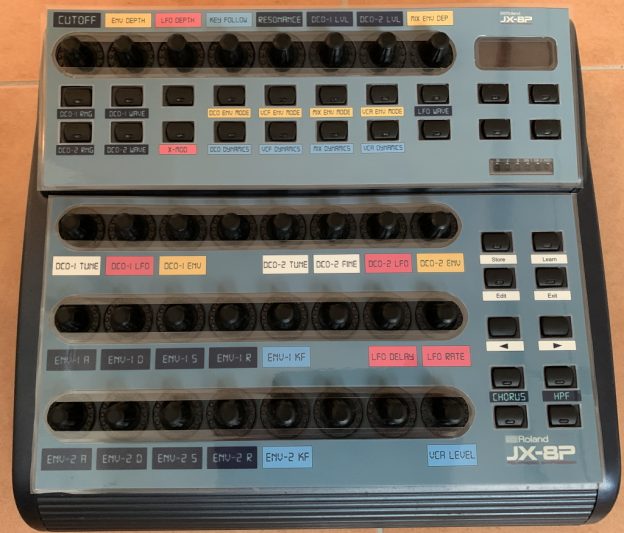
BCR2000 Resource Pack for Roland JX-8P
 BCR2000_JX-8P.zip
For more information see Custom overlays for BCR
KORG device not recognized by MIDI driver?
Is your KORG device like NTS-1 or Monologue not recognized by the KORG MID driver and you cannot perform updates or update firmware? You can try the following:
With the MIDI driver you also get utilities to add and remove devices. With a default installation (Windows based systems) you can find them in the start menu under [KORG/KORG USB-MIDI Driver Tools]. Run the [Uninstall KORG USB-MIDI Device] utility. Click Next on the first dialog page and you will get a list of all MIDI devices found on your system. Make sure that under options (click <Option …> button) the checkbox [Delete KORG MIDI device only] is checked. It prevents you from accidentally removing any other MIDI device.
Now check the list of KORG devices. If the same device is listet more than once, it can cause problems if a new device is to be added. It can happen when you have used a device with on different ports I guess. It is best to remove all occurrences of that device if you do not know which corresponds to the currently active usage. Or maybe it´s a legacy device you do not use anymore anyways. You can always reinstall that device at a later time. Simply use the corresponding [Install KORG USB-MIDI Device] utility under [KORG/KORG USB-MIDI Driver Tools].
Once your MIDI device driver usage list is in order, you should have no problems adding a new device. At least it helped me to get my NTS-1 recognized after I removed multiple usages of my nanoKontrol.
monotron Delay CV-Gate mod
The monotrons are sweet little analog toys to fiddle around with. And if you own one you have at least once thought about hacking it, right? Well, so did I and aimed at the monotron Delay. For the standard monotron a couple of resources for modders are available, and especially dinSync´s mod seems to work well for it. But the Delay version appears to handle things a little different…
The main issue is that the gate affects pitch and vice versae.
But only if you look at it from the input side, where you apply external signals to the respective testpoints. From an internal point of view the gate signal is simply derived from the same source as the pitch. So if you apply a +5V gate you are already exceeding the maximum frequency of the oscillator. This results in only a short click.
My idea now was to emulate the ribbon in some way.
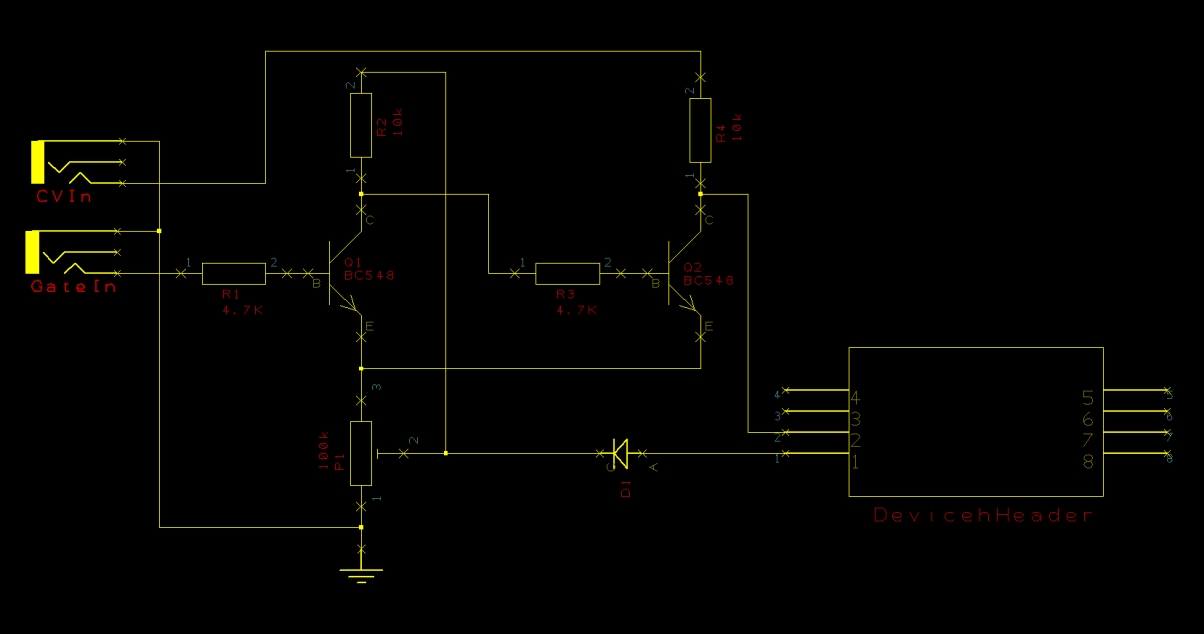
The external gate signal would basically just switch the CV signal on and off. This is what the transistors do.
The first one is a gate signal switch. As it inverts the signal, a second switching transistor is required. This one is fed by the CV voltage source.
The device is gated at a voltage leve of ~1.4 Volts (if I remeber correctly). So the lowest note signal must hit that threshold.
It appears that the gate pin carries a constant voltage of ~0.8V. I am using this as the collector voltage for the gate transistor and at the same time to generate a ground offset for both transistors.
The trimpot lets me adjust that offset so that I can shift the CV signal to the gate threshold level. The diode prevents the emitter current to flow into the gate circuitry.
As a matter of fact this works, and the CV tracking seems to work quite well as you can see in this video: